Go Docker Cli
Docker is a great tools for developers to manage projects. At COLAB,e have docker containers for many development environments such as WordPress, Django, Drupal 7 & 8.
As we rolled out docker to the old sites and the new, we encountered a problem of how to manage updates to the Dockerfile, docker-compose, as well as how to distribute those updates to a team of developers? Other issues we tackled were how to ensure that new development environments are using the latest stable version of our internal docker environment.
The first couple of attempts at this solution were by a senior developer. A simple python cli was first used to solve this problem. This was then rebuilt as a more complicated golang cli.
The go docker cli had a start, restart and update commands. I was tasked with the 2.0 version of the cli, which would handle:
- nuke : Terminate the docker container and rebuild a new container.
- build : Build a container, without terminate the old one.
- init : Initialize a new docker container.
- move : Move the root of the WordPress environment from a /web/ root to a ./ root.
As the Docker Api is used internally in this Cli, nuke and build were easily executed. The Container id was sent to the docker api, and the task is accomplished.
The move and init commands are tricky. As we use docker-compose.yaml files, these yaml files need to be parsed. Before, we utilized the io package to read and write to the file. This solution works for simple reading and writing, but to parse the whole file we need to create a map.
This is done with the use of viper, it is a config parsing program written in go.
With this in hand we were free to parse and write our yaml file. But like all production based work, there was a catch. Due to the nature of agency work, our yaml file cannot be easily placed in a type struct. To solve this problem we needed to use a interface type to manage the config file.
With all of the challenges understood and addressed, the cli could finally take shape.
Our default yaml file is of this format:
initalkey:
  build: .
  container_name: yourdomianname.tld
  volumes:
    - .:/var/www/public
  working_dir: /var/www/public
  external_links:
    - mariadb:mariadb
  environment:
    - SHELL=bash
    - VIRTUAL_HOST=yourdomianname.tld
    - VERSION=1.0
When the program is run,
We first initialize the docker-compose.yml
func getInitalKey(fileName string) {
    //get path to file name
	path := composePath + "/" + fileName + ".yml"

    //read file
	composeFile, err := ioutil.ReadFile(path)
	if err != nil {
		panic(err)
	}

    //write to string
	composeFileString := string(composeFile)

    //use the regexp package and to compile an match on the first key with a . in it
    //the "." is for legacy containers.
    r, _ := regexp.Compile("^([a-z\\-.])*")

	initalKey = r.FindString(composeFileString)

    //clean remove "." and write to file if "." exists in key.
	if strings.ContainsRune(initalKey, '.') {
		initalKeyDirty := initalKey
		initalKey = strings.Join(strings.Split(initalKeyDirty, "."), "")
		updatedKey := strings.Replace(composeFileString, initalKeyDirty, initalKey, 1)

		err = ioutil.WriteFile(path, []byte(updatedKey), 0644)
		if err != nil {
			panic(err)
		}
	}
}
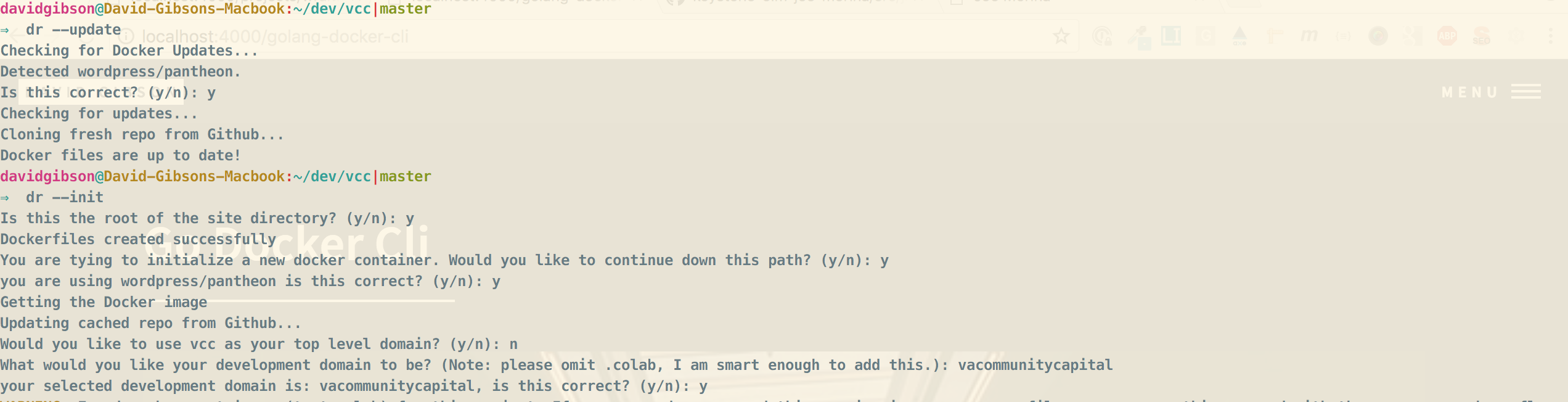
then we trigger the cli command in this case the –init function.
func dockerInit() (string, error) {
	//get container type
	containerType, err := getContainerType()
	if err != nil {
		return "", errors.New("Cannot get container type")
	}
	var promptText = "You are tying to initialize a new docker container. Would you like to continue down this path? (y/n)"

	if ok := prompt.Confirm(promptText); ok {

		promptText = "you are using " + containerType + " is this correct? (y/n)"
		if ok := prompt.Confirm(promptText); ok {
            fmt.Println("Getting the Docker image")
			compareForUpdate(containerType)
			performUpdates(containerType)
			setupDockerComposePromt(composePath)
			BuildContainer(containerID)
		} else {
			fmt.Println("Container type returned: " + containerType + " if this is incorrect. You need to log the bug in github and continue manually. I'm sorry friend.")
		}

	} else {
		fmt.Println("docker-compose init aborted")
	}

	return "", err
}
We prompt the user if the current base of the site path is correct. If not, we trigger a recursive function which asks the user to input a domain they would like to use.
func setupDockerComposePromt(siteName string) error {
	var (
		siteByPath string
		promptText string
	)

	siteByPath = path.Base(siteName)
	promptText = "Would you like to use " + siteByPath + " as your top level domain? (y/n)"

	if ok := prompt.Confirm(promptText); ok {
		setupDockerCompose(siteByPath)
	} else {
		recursiveTopLevelPrompt()
	}

	return nil
}

func recursiveTopLevelPrompt() error {
	var (
		promptText string
	)

	promptText = "What would you like your development domain to be? (Note: please omit .colab, I am smart enough to add this.)"
	tld := prompt.StringRequired(promptText)

	if ok := prompt.Confirm("your selected development domain is: %s, is this correct? (y/n)", tld); ok {
		setupDockerCompose(tld)
	} else {
		recursiveTopLevelPrompt()
	}
	return nil
}
With this initial key, we parse the yaml file using viper.
Then set the key for the container name and the virtual host. An internal key that we use in a reverse proxy to set up our local environments.
func setupDockerCompose(siteName string) {
	setInitalKey("docker-compose", siteName)

	containerName := siteName + ".colab"
	setYamlProperty("docker-compose", "container_name", containerName)

	vhost := "VIRTUAL_HOST=" + containerName
	setYamlPropertyArray("docker-compose", "environment", "VIRTUAL_HOST", vhost)
}
Now when we run our –init flag to the cli, we can build new containers with the docker api in an easy and efficient manner..